
Thermostat Not Working Troubleshooting: Twin Cities Guide
Key Takeaways
- A blank thermostat screen usually means lost power, not a dead unit. Start with fresh batteries, the breaker, and the furnace power switch.
- If the screen works but the heat or AC will not run, the thermostat is probably fine. The fault is in the HVAC system.
- A clogged condensate drain, a blown 3-amp furnace-board fuse, and a flipped furnace toggle all look like a broken thermostat.
- Smart thermostats need a C-wire for steady power. A blank Nest or Ecobee is often lost 24V common, not dead batteries.
- In a Twin Cities winter, a “dead thermostat” call is more often a furnace fault than a wall-unit fault.
- On peak summer afternoons, Xcel’s Saver’s Switch can cycle your AC off and look exactly like a broken thermostat.
Your Thermostat Went Dark: Start Here
A blank screen at 7 a.m. is stressful, and in a Twin Cities January it can feel like an emergency. The good news is that most of the time, the wall unit is not the problem. Run this thermostat not working troubleshooting decision tree before you replace anything. In our Minnesota winters and humid summers, the cause is usually lost power, a tripped safety switch, or a fault in the HVAC system itself, not a dead thermostat.
We are Northern One Hour Heating & Air Conditioning, a locally owned and operated Twin Cities HVAC company based in Ramsey. We take these calls every week, and we almost always find that the thermostat is the messenger, not the culprit. This guide walks you through the same checks we run first, in the same order, so you can fix the simple ones yourself and call us for the rest.
Thermostat Not Working Troubleshooting: The Decision Tree
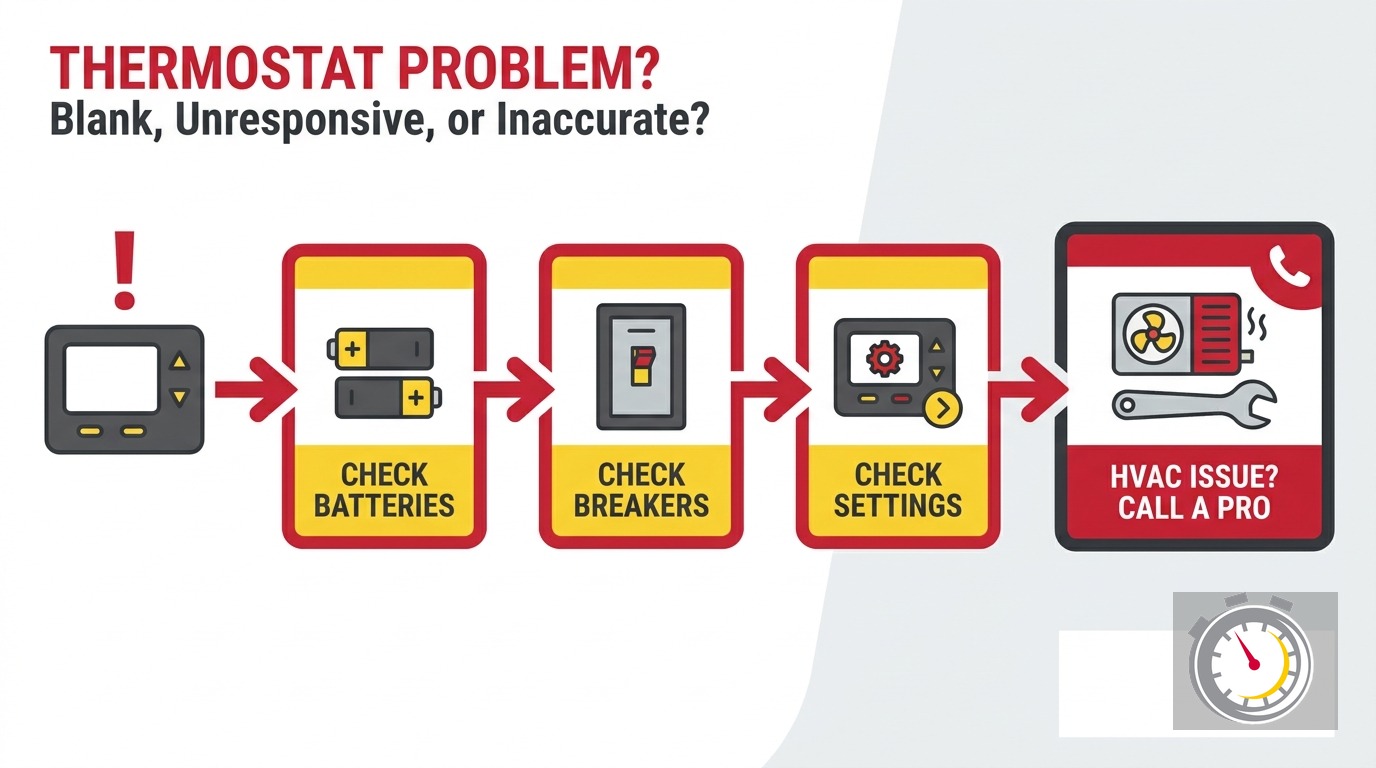
Work this top to bottom. Stop when you find the cause.
1. Is the screen blank or dark? If yes, go to step 2. If the screen is on but the system will not run, jump to step 6.
2. Does the thermostat take batteries? Many standard digital thermostats run on AA or AAA batteries. Put in a fresh set. This clears a large share of blank screens in under a minute.
3. Check the breaker and the furnace power switch. Flip the HVAC breaker in your panel off, then on. Then find the furnace power switch, the plain toggle on the wall or unit near the furnace, and confirm it is ON. It gets bumped off more often than you would think.
4. Still blank? Check the furnace control-board fuse. Most furnace boards have a small 3-amp automotive-style fuse, either ATC or ATO. If it has blown, the 24V transformer stops feeding the thermostat and the screen goes dark. Replace it with the same amperage only.
5. For a smart thermostat, check the C-wire. If you have a Nest, Ecobee, or similar unit with no batteries to change, a blank screen usually means lost 24V common power, not a bad thermostat. See the C-wire section below.
6. Screen is on, but no heat or AC. Your thermostat is likely fine. The fault is downstream in the HVAC system. Move to the heating or cooling branch below.
That is the whole map. The next sections explain each branch in more detail.
Why Is My Thermostat Screen Blank?
A blank thermostat screen almost always means the unit has lost power, not that it is broken. Work the fix in order: fresh batteries, the HVAC breaker, the furnace power switch, and the 3-amp board fuse. Most blank screens come back to life at one of these steps.
Start with the batteries. If your thermostat uses them, swap in a fresh set before you do anything else. A weak battery can also leave the screen lit but the relays too weak to call for heat or cooling. That is a confusing middle case.
Next, check the breaker. Find the one labeled furnace, air handler, or HVAC in your panel. Flip it fully off, then back on. A tripped breaker is one of the most common reasons a thermostat goes dark.
Then check the furnace power switch. This is the ordinary toggle on the wall or the side of the unit, near the furnace. It looks like a light switch, and family members flip it off by accident all the time. If it is off, the thermostat loses power.
Two causes hide inside the equipment. First, the 3-amp fuse on the furnace control board can blow from a power surge or a shorted wire, killing the 24V supply. Second, in cooling season, a clogged condensate drain can trip the drain-pan float switch. That switch cuts the 24V circuit and blanks the screen. It is doing its job, but it reads exactly like a dead thermostat. If you see standing water near the indoor unit, a clogged drain is a likely culprit.
Does the Screen Wake but the System Will Not Run?
If your thermostat screen lights up and responds to your touch, the thermostat itself is probably working. When the heat or AC still will not start, the problem is usually downstream in the HVAC system, the safety switches, or the equipment itself, not the wall control.
This is the fork where most homeowners misdiagnose. The screen looks fine, so they assume the thermostat must be sending the wrong signal. In reality, the thermostat is calling for heat or cooling, and something in the equipment is blocking it.
Common downstream causes include a dirty air filter, a frozen indoor coil, a tripped safety switch, low refrigerant, a fouled flame sensor, or a failed igniter. Notice that none of those live in the thermostat. They live in the furnace or air conditioner.
Try a quick test. Set the thermostat a few degrees above room temperature in winter, or below in summer, and listen. If you hear the thermostat click but nothing starts at the equipment, the thermostat is doing its job. The system is not. That is your cue to move into the heating or cooling branch below instead of replacing the thermostat.
Why Did My Smart Thermostat Lose Power?
A blank smart thermostat usually means lost 24V common power, not a failed device. Nest, Ecobee, and most modern units draw their main power from the furnace transformer through the C-wire, or common wire. When that path breaks, the screen goes dark even though the thermostat is fine.
The C-wire is the steady power leg that lets a smart thermostat run its screen, Wi-Fi, and software without batteries. Older homes often have a thermostat cable with no C-wire, or the wire is present but not connected at either end. A loose connection, a broken wire, or a failing transformer can all cut that power.
How we test it: at the furnace control board, we check for 24V between the R and C terminals. If there is no voltage there, the transformer or the board is the problem, not the thermostat. If the wire is missing, we can add a C-wire adapter rather than fishing new cable through your walls.
One upgrade note worth knowing. ENERGY STAR reports that variable-capacity heat pumps and air conditioners pair best with the manufacturer’s own thermostat, and that homes with large seasonal temperature swings see greater smart-thermostat savings than temperate climates (ENERGY STAR). Minnesota’s swing is about as large as it gets. So if your smart stat keeps going dark, the fix is often proper C-wire power, not a new brand.
Is It the Thermostat or the Furnace? A Minnesota Cold-Climate Check
In a Twin Cities winter, a call about a thermostat not working is more often a furnace fault. A fouled flame sensor, a bad hot-surface igniter, an inducer problem, or a rollout or limit lockout can all stop the heat while leaving the thermostat screen on and looking normal.
Here is the cold-climate reframe. When the temperature drops below zero, the stress on your furnace goes up, and the parts most likely to fail are ignition and flame-sensing parts, not the thermostat. If your screen is lit, the setpoint is above room temperature, and you still have no heat, suspect the furnace first.
The flame sensor is the single most common winter culprit. When it gets coated in residue, the furnace lights the burner, the sensor cannot confirm the flame, and the gas valve shuts off as a safety measure. The cycle repeats a few times, then the furnace locks out. The thermostat reads fine the whole time.
Other heating-side causes include a failed hot-surface igniter, a stuck or failing inducer motor, and a rollout or high-limit lockout from overheating, often tied to a dirty filter. Each stops heat at the equipment. Our furnace repair team checks all of these before we ever touch the thermostat.
If you heat with a heat pump, watch for AUX or EMHEAT. In cold weather a heat pump shifts to backup heat, and the AUX or emergency-heat indicator on the screen can make the thermostat look like it is malfunctioning. It is not. That is normal backup behavior for dual-fuel and cold-climate heat-pump systems.
Could the Thermostat Be Fine but the AC Will Not Cool?
Yes. When the thermostat screen is live but the AC will not cool, the cause is often a dirty filter, a frozen indoor coil, low refrigerant, or a clogged condensate drain tripping the float switch. None of those are thermostat problems, and all need the equipment, not the wall unit.
Cooling-season diagnosis runs parallel to heating. Start with the air filter. A clogged filter restricts airflow, which can freeze the indoor coil and stop cooling entirely. If you see frost on the refrigerant lines or the indoor coil, turn the cooling off and the fan on, replace the filter, and let the coil thaw before you test again.
Next, check the condensate drain. In humid Twin Cities summers, the drain can clog with algae and debris. When it does, the float switch trips, the AC shuts down to prevent water damage, and the thermostat looks guilty by association. Standing water near the indoor unit points you here.
Low refrigerant is a pro-only fix. If the system runs but the air at the registers is lukewarm, the charge may be low, which means a leak a licensed tech must find and seal. None of these require a new thermostat. If your AC will not cool and the screen is fine, start with our air conditioning repair team.
24V vs Line-Voltage Thermostats: A Baseboard Safety Note
Most central HVAC thermostats run on 24 volts supplied by the furnace transformer. That low voltage is what makes thermostat troubleshooting relatively safe. Electric baseboard heaters are different. They use line-voltage thermostats at 120 or 240 volts, and those are a genuinely different, higher-risk device.
Minnesota has a fair amount of electric baseboard heat in finished basements, additions, and older conversions. If a baseboard thermostat stops working, the first check is the breaker at the panel. But any replacement or wiring work on a line-voltage stat carries real shock and fire risk, and it must be done with the breaker off and verified dead.
This is where scope matters. We are an HVAC company, and line-voltage baseboard thermostat replacement is electrical work outside what we do. For those, you want a licensed electrician. We mention it here because the symptom, a thermostat that does not respond, looks identical to a 24V central-system problem, and the safety steps are not the same.
Is the Thermostat Dead, or Is It the Xcel Saver’s Switch?
On hot, humid summer afternoons, Xcel Energy’s Saver’s Switch cycles enrolled central AC compressors off for about 15 to 20 minutes at a time over roughly four hours, usually between 2 p.m. and 6 p.m. Your indoor fan keeps running, but the AC will not cool. It looks like a dead thermostat, and it is not.
This one catches Twin Cities homeowners every summer. You enrolled in the Saver’s Switch program for the bill credit, forgot about it, and now your AC seems broken on the hottest day of the year. The thermostat screen is fine. The outdoor unit is simply being cycled by the utility.
The fix is to wait it out. Set the fan to ON so air keeps moving, and the compressor will come back on within the cycle window. Xcel reports the program earns enrollees roughly a $100 enrollment credit and about 15% off the electric bill (Xcel Energy Saver’s Switch; MPR News). Before you call for AC repair on a peak afternoon, check whether you are enrolled. It could save you a service visit.
What Makes a Thermostat Inaccurate but Not Dead?
A thermostat can power on and still misread temperature. Common causes are a bad location, such as direct sunlight, a nearby supply vent, or an outside wall, a dirty sensor, weak output from old batteries, or an aging mechanical unit drifting out of calibration. Some you can fix; others mean replacement.
Location is the big one. A thermostat in a sunny hallway or above a lamp will read high and short-cycle your cooling. One near a cold exterior wall or a drafty return will read low and overwork your heat. Relocating it a few feet often fixes chronic comfort complaints that look like equipment problems.
Accuracy has a standard. ENERGY STAR certifies smart thermostats to hold temperature within about 2.0 degrees Fahrenheit and to cut HVAC runtime by at least 8% on heating and 10% on cooling versus the typical installed base (ENERGY STAR). If your current unit swings wider than that, an upgrade pays for itself faster here than in most states.
When accuracy or age is the issue rather than power, replacement is the answer. Our thermostat installation team can size the right unit for your system, and our smart thermostats guide covers the savings case in detail (smart thermostats in the Twin Cities).
Thermostat Not Working Troubleshooting: Permits, Rebates, and Credits in Minnesota
A like-for-like thermostat swap by a homeowner is usually exempt from permitting. But work on the 24V transformer, new wiring, a furnace or AC changeout, or gas piping needs a mechanical permit and inspection under Minnesota’s mechanical code.
The permit line is real. Minneapolis requires a mechanical permit to legally perform HVAC work, with plans approved and the work inspected for code compliance (City of Minneapolis). Minnesota’s mechanical code, based on the 2018 International Mechanical Code as amended, sets the installation, access, clearance, and testing rules any HVAC work must meet (Minnesota Mechanical Code). Swapping a thermostat that uses the same wires is one thing. Touching the transformer or running new cable is another, and that is when you want a pro and a permit.
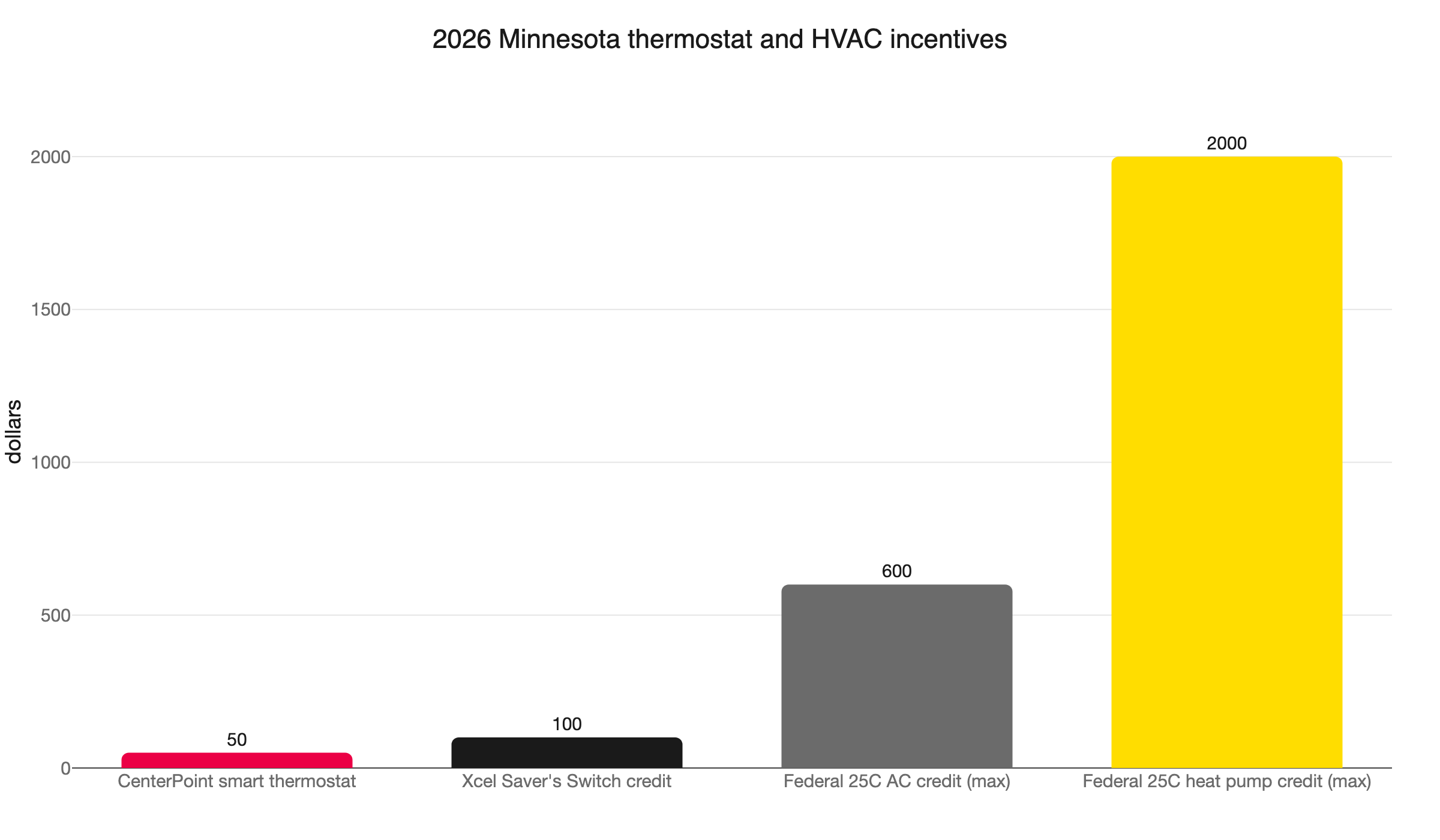
Then there is money on the table. CenterPoint Energy offers Minnesota gas customers a $50 rebate on a smart or Wi-Fi programmable thermostat and $10 on a basic programmable, one per gas service address, for equipment installed between January 1 and December 31, 2026 (CenterPoint thermostat rebate). CenterPoint also runs 2026 heating-system and furnace rebates for residential gas customers (CenterPoint heating rebates).
If your thermostat problem points to a bigger job, federal credits stack on top. The 25C tax credit covers 30% of cost, up to $600 for qualifying AC and up to $2,000 for heat pumps, claimed on IRS Form 5695 (energy.gov; IRS Form 5695). The Department of Energy also notes that high-efficiency AC plus related measures can cut air-conditioning energy use by up to 50%, and that a home energy assessment is itself eligible for a 30% credit (energy.gov).
When to Call Northern One Hour
If you have worked the decision tree and your thermostat is still blank, your heat or AC still will not run, or your system keeps short-cycling, it is time to call. We are Northern One Hour Heating & Air Conditioning, a locally owned and operated Twin Cities HVAC company based in Ramsey, serving homeowners across Minneapolis, St. Paul, Blaine, Maple Grove, Plymouth, Brooklyn Park, Woodbury, and Bloomington.
When we come out, we check power first, then the safety switches, then the equipment, in that order. We do it this way so we never sell you a thermostat you do not need. Most of the time the fix is a fuse, a switch, a sensor, or a clogged drain, not a new wall unit.
You also get our on-time promise. We are Always On Time… Or You Don’t Pay a Dime!(R), backed by a 100% satisfaction guarantee and honest, transparent pricing up front. If your thermostat problem turns out to be a larger job, like a furnace replacement, an AC install, a heat pump, or whole-home indoor air quality, we will walk you through financing options and every rebate and credit that applies.
Call us at (763) 260-6662 or book thermostat service online to schedule fast. On-Time. Every Time.
Frequently Asked Questions
Why is my thermostat screen blank? +
How do I know if the problem is the thermostat or the HVAC system? +
Why does my smart thermostat keep going dark? +
Is my AC broken, or is it the Xcel Saver's Switch? +
Need a technician now?