
Thermostat Fan Auto vs On: A Minnesota Homeowner's Guide
Key Takeaways
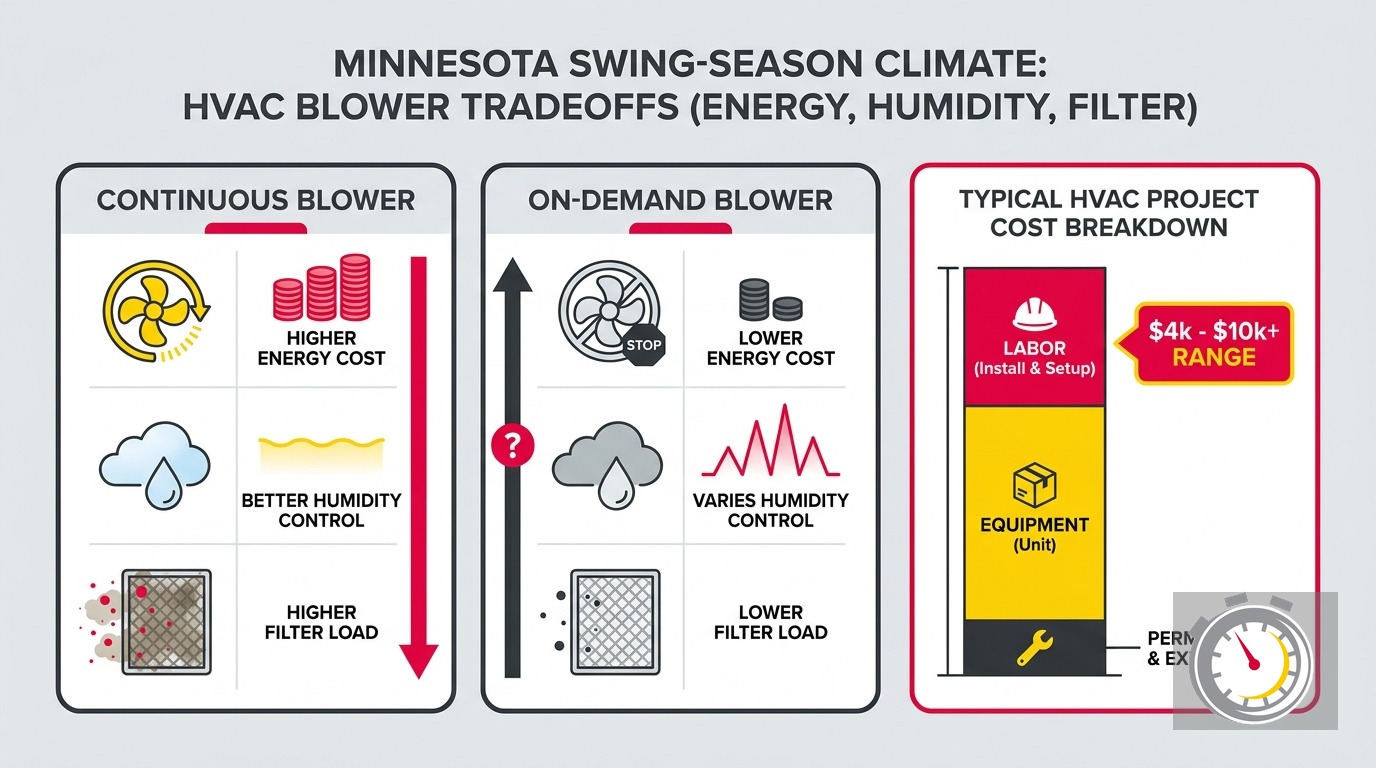
- AUTO is the right default for most Twin Cities homes. It saves energy, protects humidity levels, and extends filter life.
- Your furnace’s age changes everything. Pre-2019 furnaces use PSC blower motors that draw 400-700W. Furnaces installed after July 2019 are required to use ECM motors that draw only 80-150W at circulation speed.
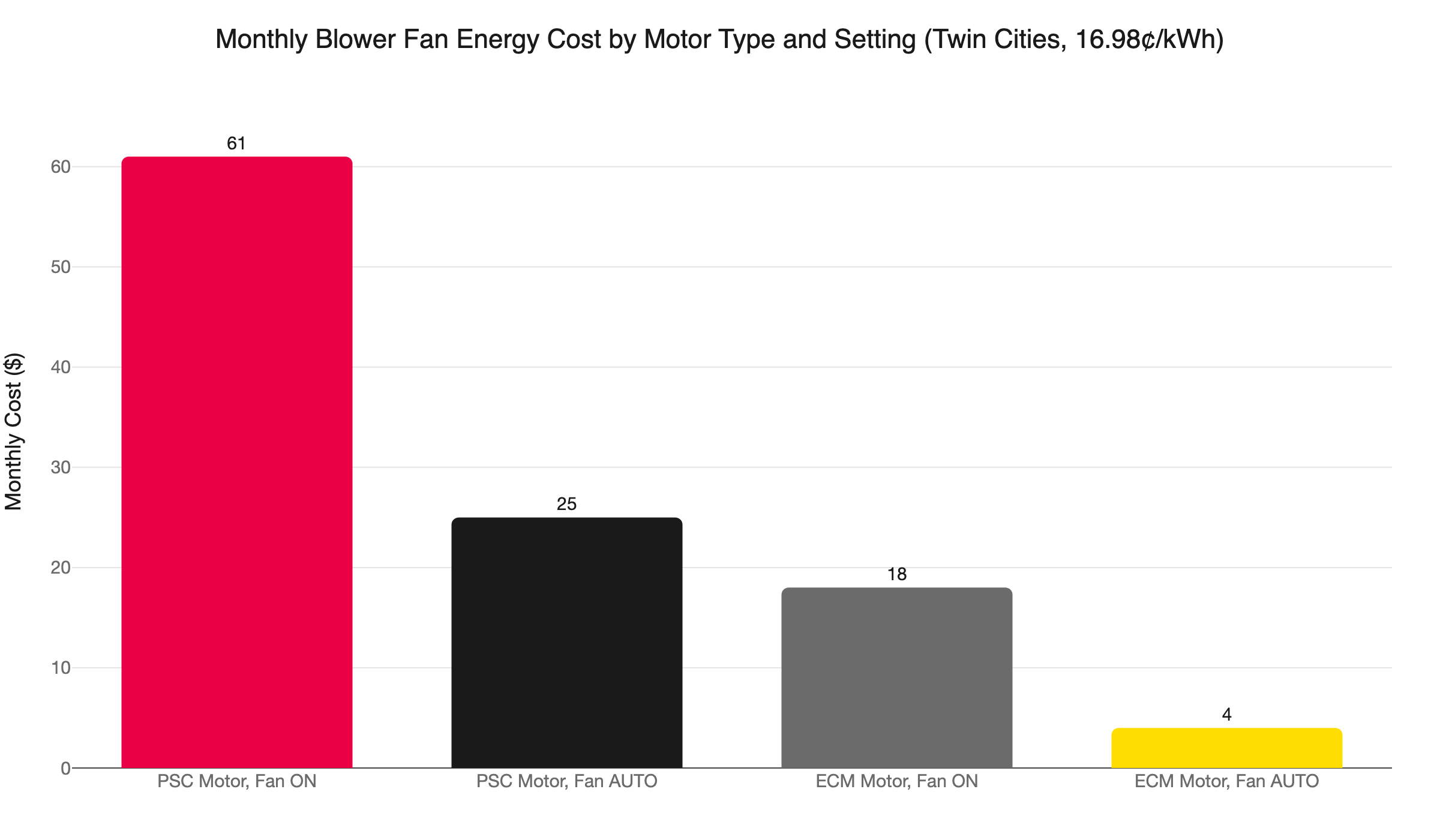
- At Xcel Energy’s 16.98¢/kWh rate, a legacy PSC blower running continuously costs about $61/month. AUTO drops that to roughly $25. That’s about $430/year just for fan energy.
- Fan ON re-evaporates humidity into your home. After the compressor stops, the evaporator coil stays wet. A fan set to ON blows that moisture back into the air instead of letting it drain.
- Minnesota’s shoulder seasons make this worse. In April-May and September-October, outdoor humidity runs 74-84%, but temperatures are too cool for the AC to run much. Short cooling cycles remove less moisture, so re-evaporation hits harder per cycle.
- Continuous fan use cuts filter life by 30-50%. Check the filter monthly if you run ON.
- Smart thermostats offer a better middle ground: Circulate mode. The fan runs 15-20 minutes per hour, giving you better air distribution without the full energy and humidity costs of continuous operation.
What Do AUTO and ON Actually Mean?
AUTO means the blower runs only during active heating or cooling cycles. ON means it runs all the time, 24 hours a day. The right choice affects energy cost, humidity control, and filter life, and the stakes depend heavily on how old your furnace is.
Your thermostat’s fan switch has two positions: AUTO and ON.
On AUTO, the blower runs when the furnace or AC is actively conditioning the air. When the system reaches setpoint, both the equipment and the fan shut off.
On ON, the blower runs continuously, regardless of whether the system is heating or cooling.
Both settings exist for a reason. ON made practical sense in older homes with poor air distribution, where running the fan helped push conditioned air into rooms the ductwork couldn’t reach well. It also made more sense before variable-speed motors existed, when fans ran at full power or not at all.
Today, the calculus is different. Motor technology has changed. Minnesota’s actual electricity rate changes the cost math. And the humidity consequences of ON mode are specific to how our climate works here, not how it works in Atlanta or Dallas.
Here’s what actually matters when you decide.
Does AUTO Mode Save Electricity?
Yes, significantly. Switching from ON to AUTO cuts fan energy use by 50-60%. At Xcel Energy’s 2026 Twin Cities rate of 16.98¢/kWh, that’s about $36/month or $430/year for a home with a pre-2019 PSC furnace motor. For a post-2019 ECM furnace, the savings shrink to roughly $2-5/month.
The math starts with wattage. A legacy PSC blower motor draws power at a consistently high rate. Running at 500W for 720 hours per month uses 360 kWh.
At Xcel Energy’s 2026 Minnesota residential rate of 16.98¢/kWh, fan motor energy use adds a notable charge to your monthly bill.
On AUTO, the fan runs during active heating or cooling cycles only. Call it roughly 10 hours per day in a typical month. That’s 300 hours, about 150 kWh, and around $25. The difference is $36/month.
Most national HVAC articles cite a $0.12/kWh national average. That rate is about 42% below Xcel’s actual residential rate in the Twin Cities. Those articles are not wrong for their geography. They are just not useful for yours.
Annual savings for a pre-2019 PSC motor: roughly $430. Annual savings for a post-2019 ECM motor: roughly $40-60. That gap in savings is why the motor question matters so much here.
Does Your Furnace Age Change the Math?
Yes, substantially. A furnace installed before July 2019 almost certainly has a PSC blower motor. One installed after that date is required by federal rules to have a more efficient ECM motor. The ON-to-AUTO cost gap is roughly ten times larger with a legacy PSC motor than with a modern ECM.
The DOE’s Fan Energy Rating rule took effect July 3, 2019. It requires all new residential furnaces to use electronically commutated motors. ECM motors cut furnace fan energy use significantly compared to PSC motors. They draw only 80-150W at circulation speed.
For a modern ECM motor, running the fan continuously costs about $18/month (108 kWh at 16.98¢). AUTO drops that to about $4/month. The gap is $14/month, or roughly $168/year.
That’s a real difference, but it’s a different argument than $430/year.
The question to ask: how old is your furnace? If it was installed before mid-2019, you almost certainly have a PSC motor. If you installed it after that date, you have an ECM. If you’re not sure, check the unit’s data plate or call us. You can also look it up yourself using our guide on how to find your HVAC system’s age and manufacture date.
The motor type determines how strong the energy argument is. But the humidity argument applies to both.
When Should You Run Your HVAC Fan on ON?
ON mode has legitimate uses, just not as a year-round default. Use it when you have a specific air quality or distribution need, not out of habit or a vague sense that more airflow is better.
Situations where ON mode makes practical sense:
- Multi-level homes with persistent temperature imbalances. If your upstairs consistently runs 6-8 degrees warmer in summer, continuous fan use can help distribute conditioned air more evenly. The effect is more pronounced in homes with longer duct runs to upper floors.
- Air quality events. During wildfire smoke events or periods of elevated outdoor particulate levels, running the fan ON with a MERV 13 filter increases the number of air passes through filtration between cooling cycles.
- Short-term air mixing after ventilating. If you’ve opened windows during a cool fall day and want to mix outdoor air through the system before closing up for the heating season, a few hours on ON can help.
- Households with severe allergies. Continuous fan operation increases filtration passes. For a household member with severe allergies or asthma, this can be a reasonable tradeoff. Just check the filter monthly and plan to replace it more often.
What ON mode does not do: improve dehumidification. During cooling season, it actively works against you on humidity.
Does Running the Fan ON Hurt Your Home’s Humidity?
Yes. When the fan keeps running after the AC compressor stops, moisture that collected on the evaporator coil evaporates back into the air instead of draining. This is the core mechanism behind the humidity penalty for ON mode.
Here’s how it works. When your AC runs, the evaporator coil gets cold. Warm, humid air passes over it and moisture condenses on the coil surface, the same physics as condensation on a cold glass. That water drips into the drain pan and exits through the condensate drain.
After the compressor stops, the coil stays wet. If the fan is set to ON, it continues pushing air over that wet coil. The moisture evaporates back into your home instead of draining away.
The result: the AC removed humidity from your air, collected it on the coil, and then the fan returned it. Net dehumidification is significantly less than it would be on AUTO.
The EPA recommends keeping indoor relative humidity between 30 and 50 percent. Levels above 60% create conditions favorable for mold and dust mite growth.
If your home already feels muggy in summer despite running the AC, switching the fan from ON to AUTO is one of the first adjustments to make. For more on how the AC functions as a dehumidifier, see our post on why homes feel humid in spring and what the AC does to control it.
Why Do Minnesota’s Swing Seasons Change This Calculation?
In the Twin Cities, April-May and September-October bring outdoor humidity of 74-84% while temperatures stay too cool for consistent AC use. When the AC fires only in short cycles, each cycle removes less moisture from the coil. Fan ON re-evaporates a larger share of what the AC worked to remove.
The humidity penalty for ON mode is not just a July problem.
Average temperatures during those months range from 47°F in April to 62°F in September. The AC rarely fires. But outdoor relative humidity during those same months runs 74-84%.
When the AC fires only occasionally, each cooling cycle is short. A short cycle condenses less moisture on the coil. So when the fan runs ON afterward, it re-evaporates a proportionally larger share of what the AC did manage to remove.
On a 55°F April afternoon, the compressor may not kick in at all. If the fan is set to ON, it just circulates unconditioned air, loads the filter with particulates, and accomplishes nothing useful in terms of comfort.
This is the piece missing from every national article on this topic. They assume a climate with consistent, sustained cooling demand. Minnesota’s shoulder seasons don’t work that way. Cooling is intermittent, outdoor humidity is persistently high, and each short cycle is more valuable for moisture removal than in a warmer climate. Fan ON wastes that advantage.
This connects to a question many Twin Cities homeowners have about running the AC in cooler weather. Our guide on the outdoor temperature thresholds for running your AC in Minnesota covers when it’s appropriate and what to watch for.
How Does Continuous Fan Use Affect Your Filter?
It shortens filter life by 30-50%. A standard 1-inch pleated filter that would last 60-90 days on AUTO can reach capacity in 45-60 days on continuous operation. Under heavy use, a MERV 7 filter can reach capacity well before the standard 12-month interval.
Most homeowners who switch to ON don’t adjust their filter change schedule. The filter clogs, airflow drops, and the system starts working harder to push air through. Restricted airflow increases motor wear and reduces heat transfer efficiency across the coil. On a pre-2019 PSC motor, the motor runs hotter. On any system, operating costs rise and equipment life shortens.
The fix is simple: check your filter every 30 days when running the fan ON. Set a phone reminder. A clean filter on a continuously running system is manageable. A clogged one on a system running 24 hours a day is not.
For guidance on which filter type and replacement schedule fits Minnesota homes, see our post on how often to change your HVAC filter.
The Middle Ground: Circulate Mode and Smart Thermostats
AUTO doesn’t mean the fan goes completely idle between conditioning cycles.
Most smart thermostats include a third option called Circulate. In Circulate mode, the thermostat runs the fan for 15-20 minutes per hour regardless of heating or cooling demand. The fan isn’t running all the time, but it runs enough to distribute air and pass it through the filter more often.
This is the setting that solves most of what people are actually trying to fix when they flip the fan to ON: temperature stratification between floors, stale air in rarely used rooms, and additional filtration passes. You get those benefits without paying for 720 hours of continuous runtime per month or dealing with the humidity re-evaporation problem on every short cooling cycle.
Closing vents in unused rooms to redirect airflow creates its own set of pressure and duct problems. Our post on whether closing HVAC vents actually saves energy explains why that approach typically backfires.
CenterPoint Energy offers up to $50 in rebates on qualifying smart thermostats for Minnesota residential customers. Xcel Energy offers up to $180 on qualifying models. If you’re still on a basic programmable or manual thermostat, those rebates make upgrading easier to justify.
A smart thermostat also gives you more control over how the system pre-conditions your home before occupied periods. For an explanation of how that feature works, see our post on how smart thermostat recovery mode works in Minnesota homes.
Which Setting Is Right for Your Home?
AUTO is the right default for most Twin Cities homes. Pre-2019 PSC furnace? AUTO saves roughly $430/year at current Xcel rates and protects humidity control. Post-2019 ECM furnace? The energy savings are smaller, around $168/year, but the humidity argument still holds during cooling season and shoulder months.
Run the fan ON only when you have a specific reason: floor-to-floor temperature imbalances, a smoke event air quality response, or a household allergy need. In most of those cases, a smart thermostat’s Circulate schedule gets you the same benefit with fewer downsides.
If your home’s humidity has been off during the cooling season, or if your utility bills seem higher than they should be, a system tune-up is the right starting point. Our team can confirm which motor type your furnace uses, check your thermostat settings, and look for anything in the system not performing as expected.
We’re locally owned and operated in Ramsey, Minnesota, serving Minneapolis, St. Paul, Blaine, Maple Grove, Plymouth, Brooklyn Park, Woodbury, and Bloomington. We show up when we say we will. That’s the promise behind “Always On Time… Or You Don’t Pay a Dime!(R).”
Call (763) 260-6662 or book online to schedule a tune-up or thermostat consultation.
Frequently Asked Questions
Is 75°F a good temperature to set the AC? +
Need a technician now?